STAY HOME! STAY SaVE

Techies Net
  • Home
  • Software
    • Dotiny
  • Web & App Development
    • Website Builder
    • App Development
  • Request Review
  • Advertise
  • Mobile App
  • Contact Us

How To Create & Run PHP Website Or Application In Netbeans IDE?

12/3/2015

4 Comments

 
Our today's how-to post is as per web developers where in we are helping to run a PHP code in a popular IDE called the Netbeans. You may be thinking whether it is possible to run a PHP code with intelli-sense in Netbeans? Yes, it it possible with our easy and simple tricks. Check it out.
Picture
Usually PHP developer edits the code in Notepad++ and execute it in XAMPP localhost. 
Also in our method you will be using the Xampp but the editor will be Netbeans. The purpose behind is to avoid or remove errors, exceptions in the program implicitly during the program creation. Apart from that you will get Intelli-sense (Automatic dropdown) to know about the classes, functions of PHP directly in the Netbeans. The developer will feel the same environment he observes in Visual Studio. So to begin, read further.

How To Create & Run PHP Website Or Application In Netbeans

Pre-requistics
  • Netbeans IDE 7 or above
  • Xampp
Steps
  • First of all download and install Netbeans and Xampp on your computer.
  • After installation, open Xampp ->  Start Apache -> Start MySQL (if require).
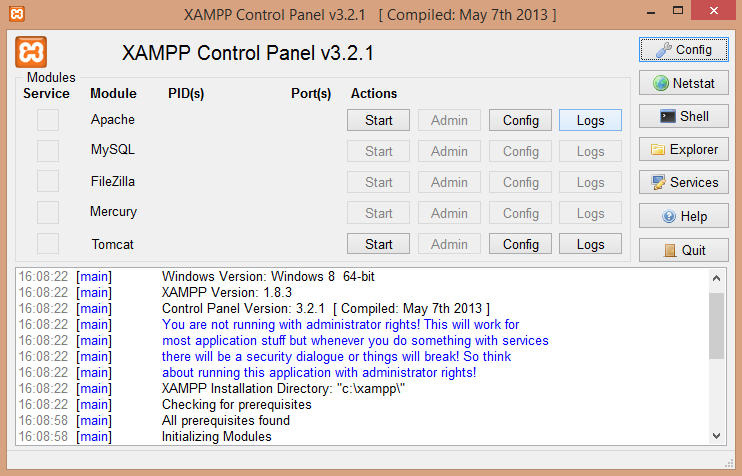
Xampp Control
  • Now that you have started the Xampp, open Netbeans and Go to Tools -> Options.
  • There click on PHP logo and enter the following url in PHP Interpreter = C:\xampp\php\php.exe.
  • Later select the Output Window, Web Browser and editor. Click Apply and press Ok.
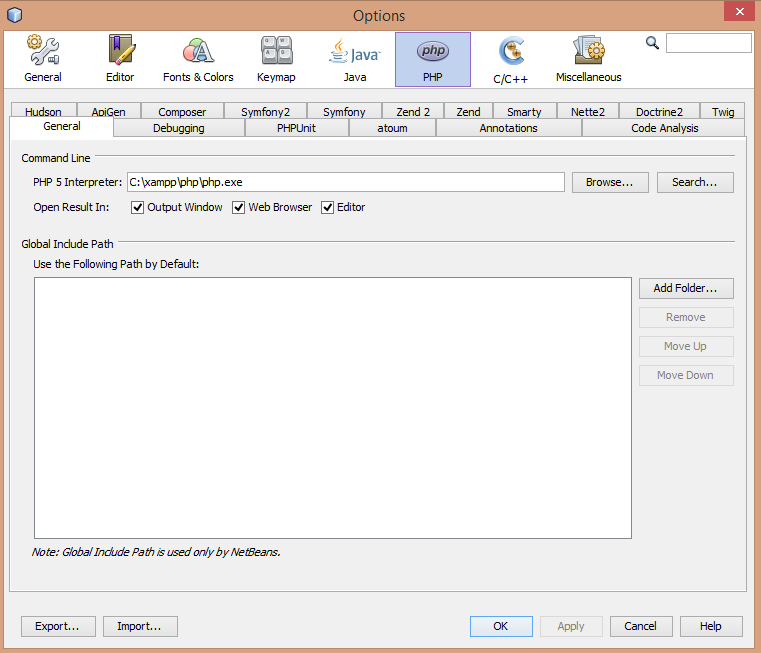
PHP Interpreter In Netbeans
  • Now Go to File -> New Project -> Click on PHP project -> Click on PHP application and click next.
  • Enter project name (Techies Net) and select the source folder ("C:\xampp\htdocs\TechiesNet") in your computer using browse option.
  • Select PHP version and default UTF-8 encoding and press next.
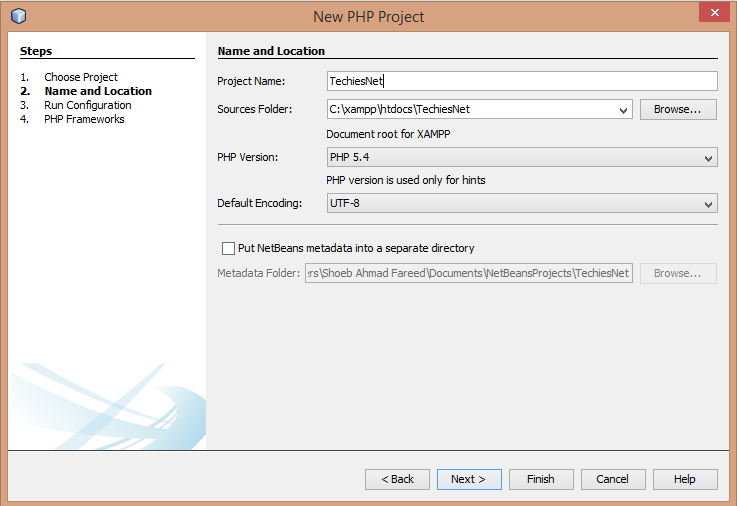
New PHP project Netbeans
  • Later setup the run configuration and start PHP programming in index.php file.
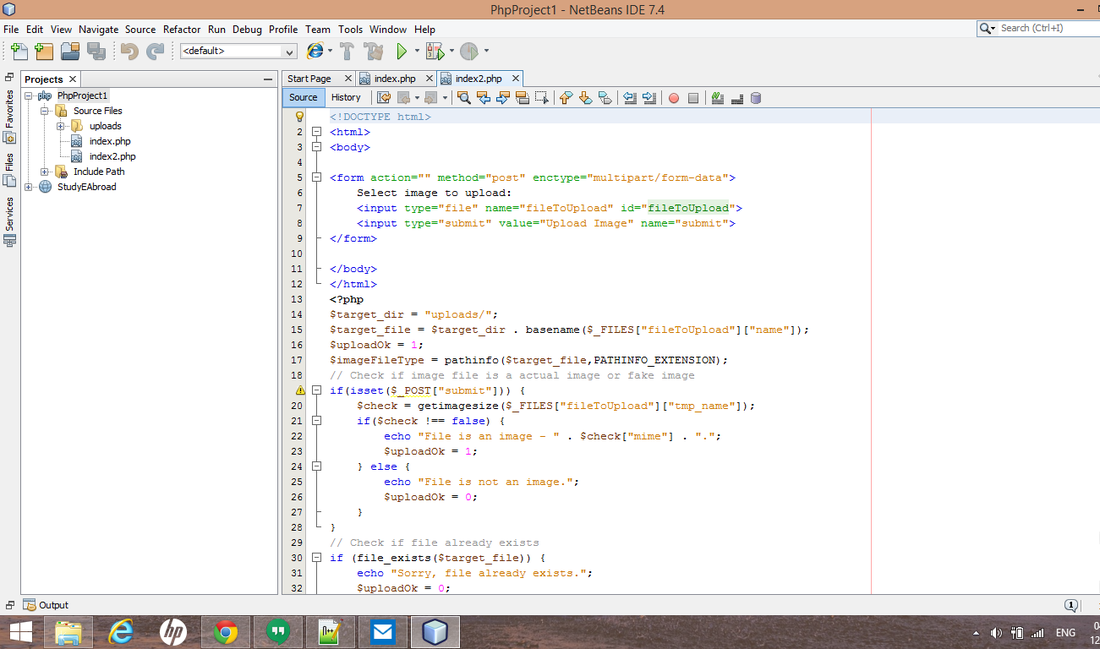
PHP Project

Author : Shoeb Ahmad Fareed

Shoeb Ahmad Fareed
Designation: Founder & CEO
Bio: A Technology Leninist who believes that success can only be achieved if one has a practical implementation knowledge. He is a Computer Science Engineer, a professional blogger and a debugger.

Share This Post


4 Comments
Tony link
13/3/2015 10:10:55 pm

Nice article. Maintaining a website is a hard task. Your guy's website is awesome.

Reply
Shoeb Ahmad Fareed
14/3/2015 01:42:07 am

Thanks @Tony for following us.....

Reply
tony link
14/3/2015 04:04:24 am

I also own a website, i though it was easy to do everything before i started, but then i realized how difficult it is to create content especially posting everyday and gave up. You guys are doing great. I salute you for you hard work. My website: http://techiasm.com/

Shoeb Ahmad Fareed
14/3/2015 04:28:29 am

Thankyou for the compliment...

Reply


Leave a Reply.

    Get Updates Via Email

    Enter Email Address

    7:00 AM - 9:00 AM IST

    Blog Sponsors


    Category

    All
    Apps
    Camera
    Cars Bikes
    Cloud
    Computers
    Earn Easy Money
    Education
    Entertainment
    Fun
    Games
    How To
    Innovation
    Mobile
    News Internet
    News Internet47f3cea023
    News Internet769585a1ca
    News Of Internet
    News Of Internet
    SmartBand
    Smartwatch
    Software
    Technology

    Archives

    January 2019
    July 2018
    June 2018
    May 2018
    April 2018
    March 2018
    February 2018
    December 2017
    August 2017
    July 2017
    June 2017
    May 2017
    April 2017
    March 2017
    February 2017
    January 2017
    December 2016
    November 2016
    October 2016
    September 2016
    August 2016
    July 2016
    June 2016
    May 2016
    April 2016
    March 2016
    February 2016
    January 2016
    December 2015
    November 2015
    October 2015
    September 2015
    August 2015
    July 2015
    June 2015
    May 2015
    April 2015
    March 2015
    February 2015
    January 2015
    December 2014
    November 2014
    October 2014
    September 2014
    August 2014
    July 2014
    June 2014
    May 2014
    April 2014
    March 2014
    February 2014
    January 2014
    December 2013
    November 2013
    October 2013
    September 2013
    August 2013
    July 2013
    June 2013
    May 2013
    April 2013
    March 2013
    February 2013
    January 2013
    December 2012
    November 2012
    October 2012
    September 2012
    August 2012
    July 2012
    June 2012
    May 2012
    April 2012
    March 2012
    February 2012
    January 2012
    December 2011
    November 2011
    October 2011
    September 2011
    August 2011
    July 2011
    June 2011
    May 2011
    April 2011
    March 2011
    February 2011

Contact Us

Email: [email protected]

Stay Connected

Download Our Mobile App 

Techies Net Mobile App
Copyright © 2011-2019 Techies Net | Our Logo | Advertise | Careers | Donate Us | All Right Reserved.
All the trademarks are sole property of their respective owners.

Powered By HostChef.In

  • Home
  • Software
    • Dotiny
  • Web & App Development
    • Website Builder
    • App Development
  • Request Review
  • Advertise
  • Mobile App
  • Contact Us